
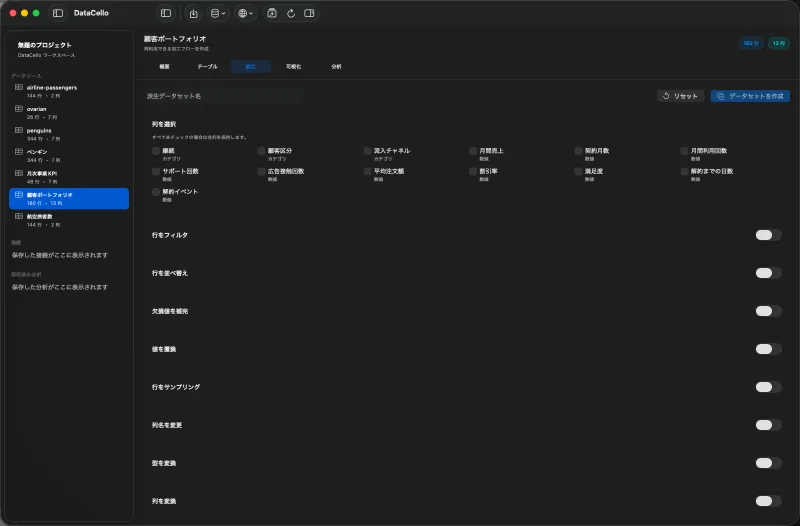
Check the data grain
This workflow expects one row per order and an order-date field. Parse a text date first. If an order number repeats across line items, raw row counts are not order counts; remove duplicates or otherwise align the grain first.
Create a weekday field
- Select the order dataset in the sidebar, click
Table, then open theWrangletab. - When the order date is text, turn on
Parse Dateand choose the matchingFormat. Skip this when it is already a date. - Turn on
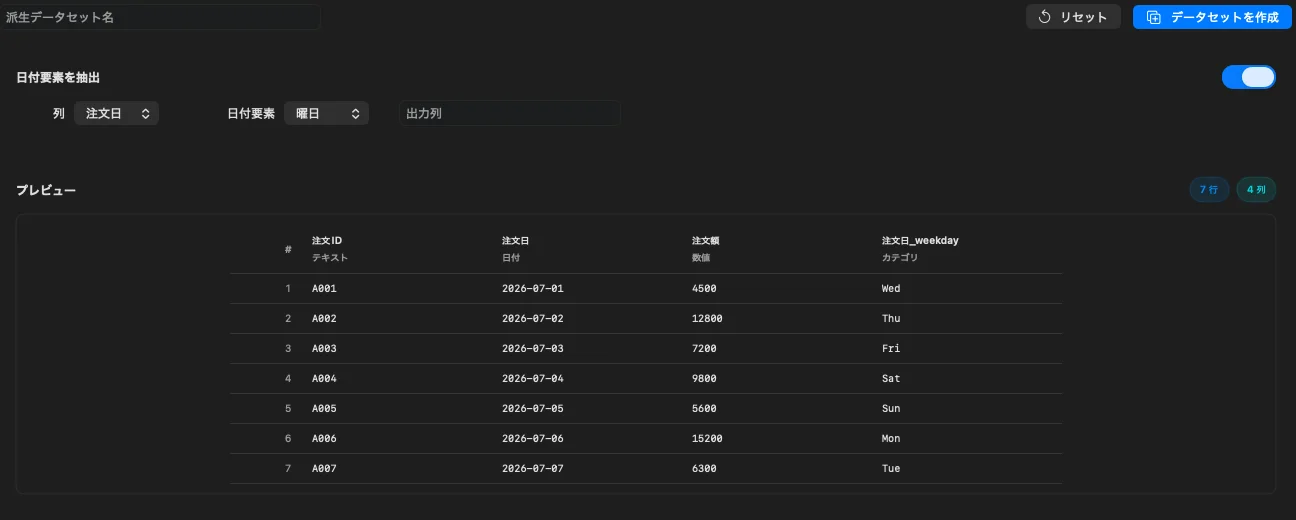
Extract Date Part, select the order date asInput Column, and chooseWeekdayas the date part. - Name the output
Order Weekdayand inspect the preview.
Count orders by weekday
- In the same wrangling panel, turn on
Aggregate Rows. - Set
Group BytoOrder Weekday. - Choose
Countas the aggregate function and name the resultOrder Count. - Confirm one row per weekday in the preview and click
Create Dataset. - Optionally open
Visualizefor the new dataset and compare weekday and order count in a bar chart.
Limitations to consider
Raw counts can be misleading when the date range contains different numbers of each weekday. Holidays, opening hours, and timezone also matter. DataCello creates weekday and count fields; it does not automatically normalize business days or establish causality.