
This analysis requires DataCello Pro
Running K-Means requires DataCello Pro. Prepare one row per customer and at least two numeric fields such as spend, purchase count, or usage count.
Names, email addresses, and free text are not direct features in this workflow. Rows missing a selected feature are excluded from the complete analysis rows.
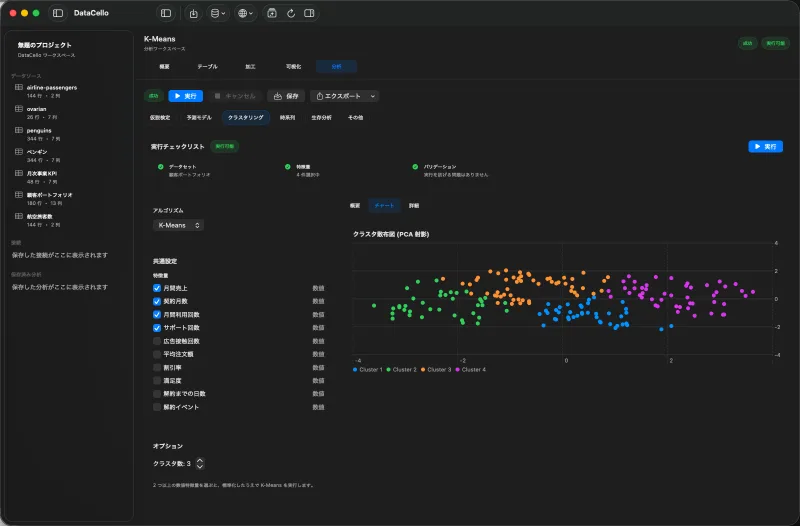
Configure K-Means
- Select the customer dataset, click the
Analysistab, and choose theClusteringcategory. - Select
K-Meansfrom the algorithm menu and choose two or more numeric features. - Enter the number in
Cluster Count. - Review the run checklist and click
Run.
DataCello standardizes the selected inputs before fitting K-Means. This reduces the chance that a field with larger units dominates distance on scale alone.
Read the result
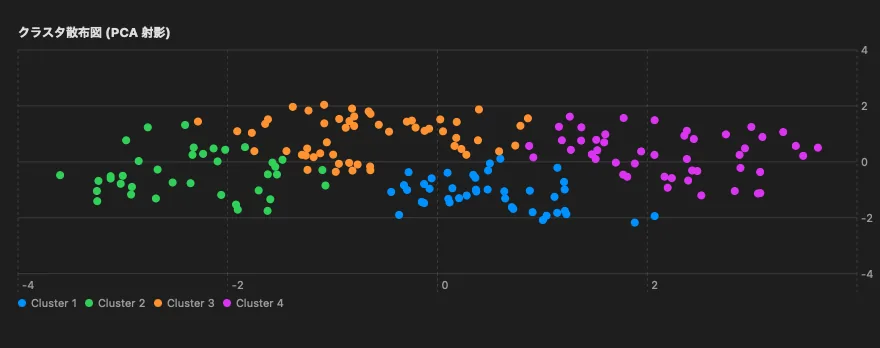
Inspect the cluster scatter plot, row counts, and cluster centers in original units. A cluster with high spend and frequency is a pattern in this dataset, not an automatic proof of a valuable segment.
Try more than one cluster count. Check whether clusters are large enough and whether their differences can be explained in the business context.
Current scope
- K-Means uses two or more numeric features and standardized inputs.
- Cluster centers are available for interpretation.
- Batch assignment of new unseen data and automated campaign delivery are not part of the current app.